Subscribing to Market Data
Participants can subscribe to market data for a given symbol using a MarketDataRequest [V] message.Table 20: MarketDataRequest (V) message
| Tag | Field Name | Req’d | Data Type | Comments |
|---|---|---|---|---|
| < Standard Header > | Y | 35 = V | ||
| 262 | MDReqID | Y | String | Unique ID for this request |
| 263 | SubscriptionRequestType | Y | char | Type of subscription requested 0 = Snapshot 1 = Snapshot plus Updates 2 = Delete previous request (unsubscribe) |
| 264 | MarketDepth | Y | int | Depth requested. (Maximum of 25 levels) 0 = Full book depth 1 = Top of book (best prices only) 2+ = Number of levels requested |
| 267 | NoMDEntryTypes | N | NumInGroup | |
| →269 | MDEntryType | N | char | A repeating group of MD Entry Types requested 0 = Bid 1 = Offer 2 = Trade 4 = Opening Price 5 = Closing Price 6 = Settlement Price 7 = Trading Session High Price 8 = Trading Session Low Price B = Trade Volume g = Trading Reference Price |
| 146 | NoRelatedSym | Y | NumInGroup | Number of symbols requested |
| →55 | Symbol | Y | String | Instrument symbol. |
| < Standard Trailer > | Y |
Table 21: MarketDataSnapshotFullRefresh (W) message
| Tag | Field Name | Req’d | Data Type | Comments |
|---|---|---|---|---|
| < Standard Header > | Y | 35 = W | ||
| 22 | SecurityIDSource | Y | int | 8 = Exchange symbol |
| 48 | SecurityID | Y | String | Will always equal Symbol (55) |
| 55 | Symbol | Y | String | Instrument symbol |
| 167 | SecurityType | N | String | Type of instrument CS = Common Stock FUT = Future FXSPOT = FX Spot (incl. crypto) FXSWAP = FX Swap OOF = Options on Futures OPT = Option NONE = Other |
| 262 | MDReqID | Y | String | The ID of the request as indicated on the request. |
| 292 | Corporate Action | C | char | Provided if the instrument is currently subject to a Corporate Action. A = Ex-Dividend B = Ex-Distribution C = Ex-Rights D = New E = Ex-Interest F = Cash Dividend G = Stock Dividend H = Non-Integer Stock Split I = Reverse Stock Split J = Standard-Integer Stock Split K = Position Consolidation L = Liquidation Reorganization M = Merger Reorganization N = Rights Offering O = Shareholder Meeting P = Spinoff Q = Tender Offer R = Warrant S = Special Action T = Symbol Conversion U = CUSIP or Name Change V = Leap Rollover W = Succession Event |
| 268 | NoMDEntries | Y | NumInGroup | The number of market data levels returned. Might be zero if the symbol is valid but there are currently no bids/offers in this symbol. |
| → 269 | MDEntryType | Y | char | Type of entry 0 = Bid 1 = Offer 2 = Trade 4 = Opening Price 5 = Closing Price 6 = Settlement Price 7 = Trading Session High Price 8 = Trading Session Low Price B = Trading Session Volume g = Trading Reference Price |
| → 270 | MDEntryPx | Y | Price | Price level |
| → 271 | MDEntrySize | C | Qty | Quantity of the individual order or trade, or the aggregate quantity where MDEntryType (269) = B (Trading Session Volume). Not sent for session open / high / low. |
| → 272 | MDEntryDate | Y | UTCDateOnly | Time priority (date) of the order. |
| → 273 | MDEntryTime | Y | UTCTimeOnly | Time priority (time) of the order. |
| → 336 | TradingSessionID | C | String | Sent for entries other than MDEntryType (269) = 0 (Bid) or 1 (Offer): • CLOSED • OPEN • PREOPEN • SUSPENDED • EXPIRED • TERMINATED • HALTED • MATCH_AND_CLOSE_AUCTION |
| → 1151 | SecurityGroup | C | String | The name of the group of related securities to which this instrument belongs. |
| → 1070 | MDQuoteType | C | int | Identifies market data quote type. Only sent for MDEntryType (269) = 4 (Opening Price). 0 = Indicative |
| → 59 | TimeInForce | C | char | Sent for MDEntryType (269) = 0 (Bid) or 1 (Offer). The time in force for this order. 0 = Good for day 1 = Good till cancel 6 = Good till date |
| → 37 | OrderID | C | String | Sent for MDEntryType (269) = 0 (Bid) or 1 (Offer). Matches the order ID in the ExecutionReport [8] acknowledgement, allowing Participants to identify their own orders within market data. Typically a 13-character alphanumeric string. |
| → 278 | MDEntryID | C | String | Sent for MDEntryType (269) = 0 (Bid) or 1 (Offer). Unique reference for the entry. Typically 13-character alphanumeric string. |
| → 40 | OrdType | C | char | Sent for MDEntryType (269) = 0 (Bid) or 1 (Offer). |
| → 126 | ExpireTime | N | UTCTimestamp | Sent for MDEntryType (269) = 0 (Bid) or 1 (Offer) where the order has ExpiryTime (126) set. |
| < Standard Trailer > | Y |
Figure 14: Successful market data subscription with snapshot and incremental updates
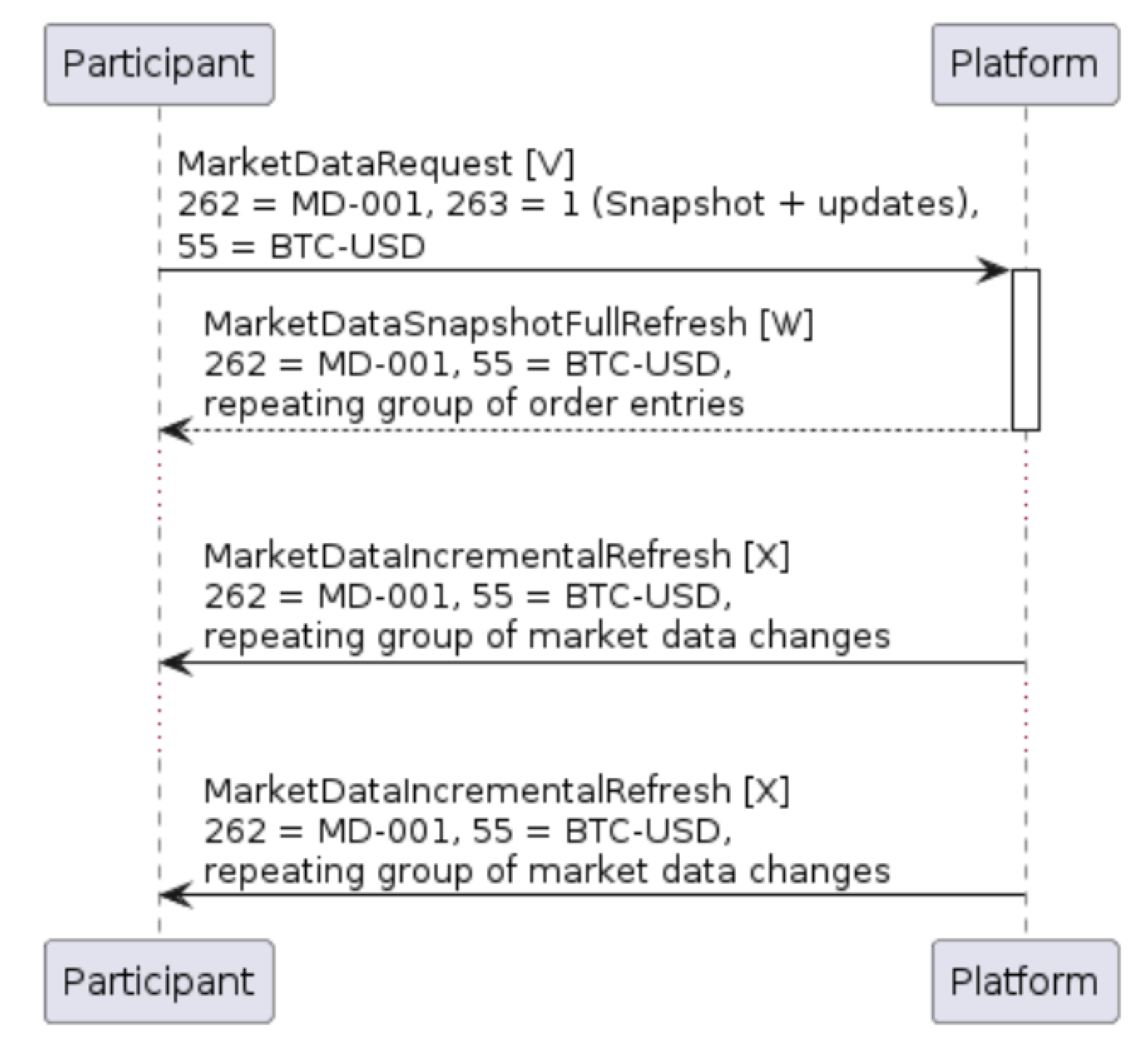 If the participants subscribed to ongoing updates for the instrument(s), the platform will then start sending unsolicited MarketDataIncrementalRefresh [X] messages which contain a mixture of trade and/or order book update messages.
These incremental market data messages may contain a repeating group of updates in a single message. For example, an incoming sell order which enters the order book, executes against a resting buy order with the remainder written to the order book will trigger a MarketDataIncrementalRefresh [X] message containing the following updates:
If the participants subscribed to ongoing updates for the instrument(s), the platform will then start sending unsolicited MarketDataIncrementalRefresh [X] messages which contain a mixture of trade and/or order book update messages.
These incremental market data messages may contain a repeating group of updates in a single message. For example, an incoming sell order which enters the order book, executes against a resting buy order with the remainder written to the order book will trigger a MarketDataIncrementalRefresh [X] message containing the following updates:
- The deletion of the previous best bid (as a result of the immediate fill)
- The addition of a new best bid (next-best bid price)
- The deletion of the best offer (new order has a better price)
- The addition of a new best offer (representing the balance of the incoming sell order)
- A record relating to the trade, and
- A record relating to updated overall market volume
Table 22: MarketDataIncrementalRefresh (X) message
| Tag | Field Name | Req’d | Data Type | Comments |
|---|---|---|---|---|
| < Standard Header > | Y | 35 = X | ||
| 262 | MDReqID | Y | String | The ID of the request as indicated on the request |
| 268 | NoMDEntries | Y | NumInGroup | |
| → 279 | MDUpdateAction | Y | char | The type of action conveyed by this block. 0 = New 1 = Change 2 = Delete |
| → 269 | MDEntryType | C | char | Type of entry. Set where MDUpdateAction (279) = (0) New or 1 (Change) 0 = Bid 1 = Offer 2 = Trade 4 = Opening Price 5 = Closing Price 6 = Settlement Price 7 = Trading Session High Price 8 = Trading Session Low Price B = Trade Volume g = Trading Reference Price |
| → 278 | MDEntryID | N | String | Unique reference for this entry. Typically a 13-character alphanumeric string. |
| → 55 | Symbol | Y | String | Instrument symbol |
| → 22 | SecurityIDSource | Y | int | 8 = Exchange symbol |
| → 48 | SecurityID | Y | String | Will always equal Symbol (55) |
| → 167 | SecurityType | N | String | Type of instrument CS = Common Stock FUT = Future FXSPOT = FX Spot (incl. crypto) FXSWAP = FX Swap OOF = Options on Futures OPT = Option NONE = Other |
| → 1151 | SecurityGroup | N | String | Security sub-type. For example “Equities” |
| → 270 | MDEntryPx | N | Price | Order level price where MDEntryType (269) = 0 (Bid) or 1 (Offer) Traded price where MDEntryType (269) = 2 (Trade) Total value traded where MDEntryType (269) = B (Trade Volume) |
| → 271 | MDEntrySize | N | Qty | Remaining order size where MDEntryType (269) = 0 (Bid) or 1 (Offer). Will be zero where MDUpdateAction (279) = 2 (Delete) Trade size where MDEntryType (269) = 2 (Trade) Total quantity traded where MDEntryType (269) = B (Trade Volume) |
| → 272 | MDEntryDate | N | UTCDateOnly | The date on which the price level or trade occurred |
| → 273 | MDEntryTime | N | UTCTimeOnly | The time at which the price level updated or trade occurred (in UTC) |
| → 59 | TimeInForce | N | char | Time in force for this order. 0 = Good for day 1 = Good till cancel 6 = Good till date |
| → 126 | ExpireTime | N | UTCTimestamp | Populated where TimeInForce (59) = 6 (Good Till Date) |
| → 37 | OrderID | N | String | Only sent for price level updates. Will match OrderID (37) in the ExecutionReport [8], allowing Participants to identify their own orders within market data. |
| → 40 | OrdType | N | char | 2 = Limit order K = Market-to-limit order |
| → 828 | TrdType | N | int | Only sent for trades. 0 = Regular trade |
| → 1003 | TradeID | N | String | Only sent for trade updates. Will match the ExecID (17) in the ExecutionReport fill, allowing Participants to identify their own trades within market data. |
| → 2446 | AggressorSide | N | char | Only sent for trades. Indicates which side was the aggressor in a trade. 1 = Buy 2 = Sell |
| → 336 | TradingSessionID | C | String | Sent for trades: • OPEN • MATCH_AND_CLOSE_AUCTION |
| < Standard Trailer > | Y |
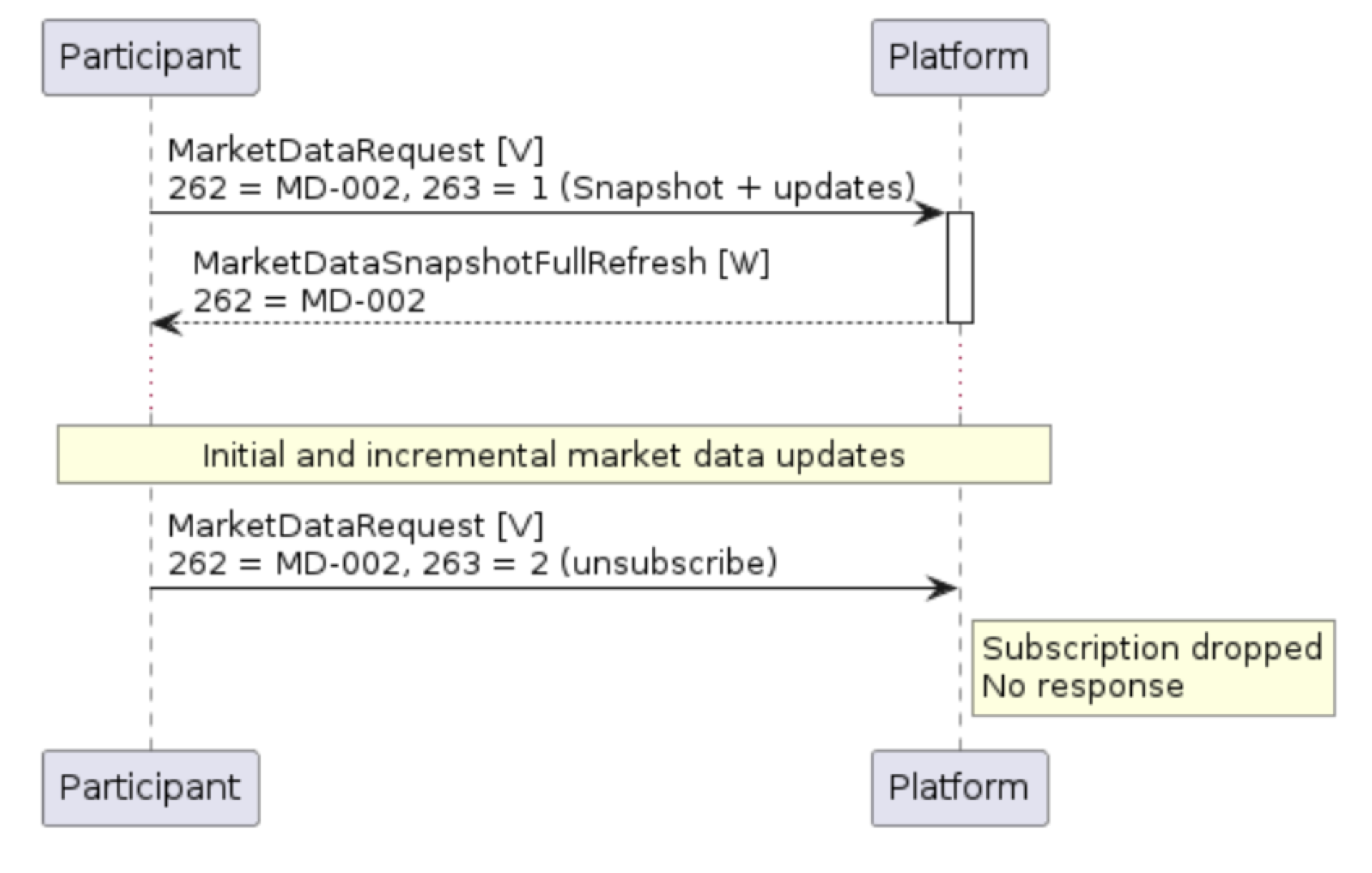
Unsubscribing from Market Data
Participants can unsubscribe from a piece of market data by entering a second MarketDataRequest [V] message, referencing the original MDReqID (262) reference and setting SubscriptionRequestType (263) = 2 (unsubscribe). Note that there is no explicit response to requests to unsubscribe from the PMX Platform; a successful unsubscription will simply prevent further MarketDataIncrementalRefresh [X] messages.Figure 15: Successful market data subscription and unsubscription