

Establishing and Maintaining a FIX Session
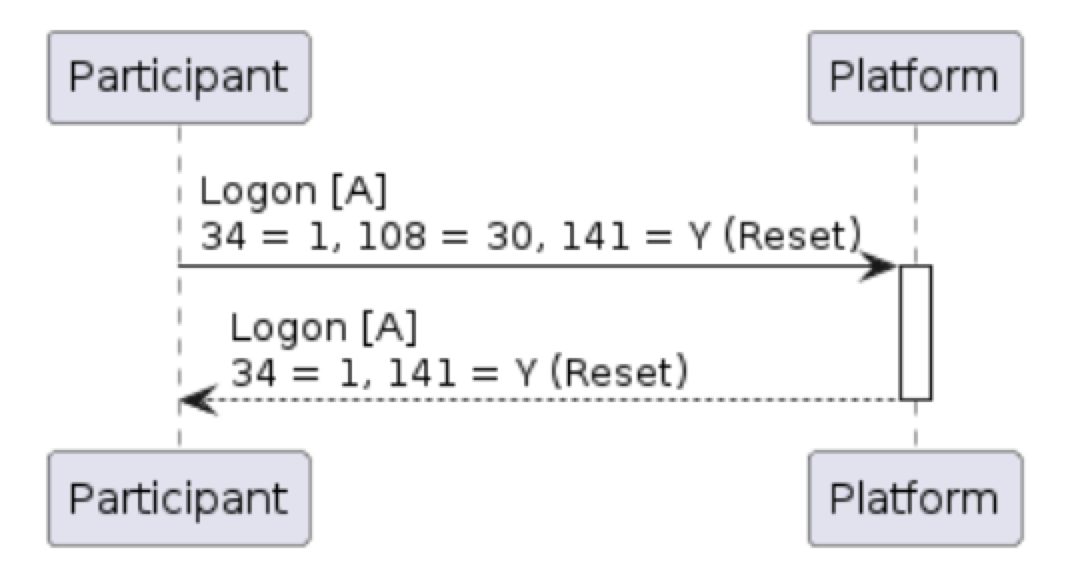
The Logon [A] message initiates a connection to the PMX platform. FIX sessions are typically initiated by customers (as opposed to the exchange platform), and can be made any time. Important: Logon [A] messages must NOT specify a SenderSubID [50] in the header. Sending this tag will cause the logon attempt to be rejected.Table 4: Logon (A) message
| Tag | Field Name | Req’d | Data Type | Comments |
|---|---|---|---|---|
| Standard Header | Y | 35 = A | ||
| 98 | EncryptMethod | Y | int | Encrypted messages are not supported. 0 = None |
| 108 | HeartBtInt | Y | int | A 30-second interval is recommended |
| 141 | ResetSeqNumFlag | Y | Boolean | Indicates both sides of a FIX session should reset sequence numbers back to 1 during a normal end of session (and not due to an unintended disconnect). Recommended |
| 1137 | DefaultApplVerID | Y | String | Specifies the FIX 5.0 service pack release being applied. 9 = FIX50SP2 |
| Standard Trailer | Y |
Example 1: Logon message
Figure 1: Successful Logon
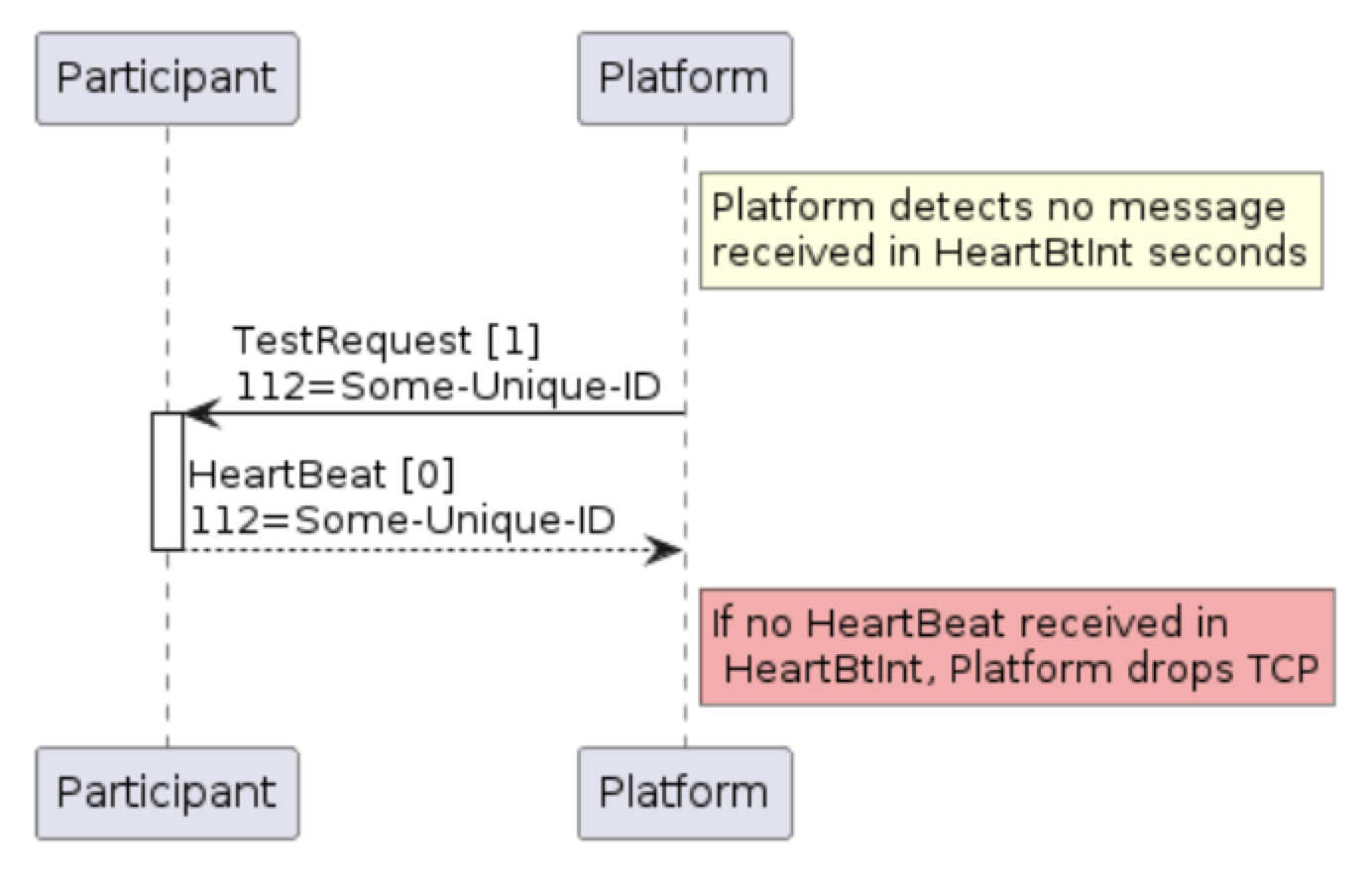
 Under normal circumstances, both FIX engines on either side of the connection will regularly exchange Heartbeat messages. The frequency of such a message exchange is determined by the HeartBtInt (108) value indicated in the Logon [A] message.
Regular application messages qualify as a heartbeat, i.e both sides of the connection are behaving nominally if a message is received during the HeartBtInt (108). If no application messages are received during the interval, the Heartbeat [0] message is used as described below.
Under normal circumstances, both FIX engines on either side of the connection will regularly exchange Heartbeat messages. The frequency of such a message exchange is determined by the HeartBtInt (108) value indicated in the Logon [A] message.
Regular application messages qualify as a heartbeat, i.e both sides of the connection are behaving nominally if a message is received during the HeartBtInt (108). If no application messages are received during the interval, the Heartbeat [0] message is used as described below.
Table 5: Heartbeat (0) message
| Tag | Field Name | Req’d | Data Type | Comments |
|---|---|---|---|---|
| Standard Header | Y | 35 = 0 (zero) | ||
| 112 | TestReqID | N | String | Required when the heartbeat is the result of a TestRequest [1] message |
| Standard Trailer | Y |
Table 6: TestRequest (1) message
| Tag | Field Name | Req’d | Data Type | Comments |
|---|---|---|---|---|
| Standard Header | Y | 35 = 1 | ||
| 112 | TestReqID | Y | String | ID to be returned in the resulting Heartbeat [0] response |
| Standard Trailer | Y |
Figure 2: Using TestRequest [1] to request Heartbeat [0] from other side
Cancel on Disconnect
Cancel on Disconnect is an optional feature which can act as an automatic risk control for participants in the event that application connectivity is lost. Examples may include where a Participant’s application stops responding to messages for a certain period. In these circumstances, the PMX platform will automatically cancel all open (unexecuted) DAY orders for the Participant while GTC and GTD orders continue to rest. Note that a network-level disconnect instantly triggers this Cancel on Disconnect functionality. After reconnecting, missed messages will be replayed including execution reports for any canceled orders. Cancel on Disconnect is disabled by default, and enabled on a session-by-session basis. Contact your exchange operator representative to enable this functionality.Sequence Number Tracking, Recovery, and Reset
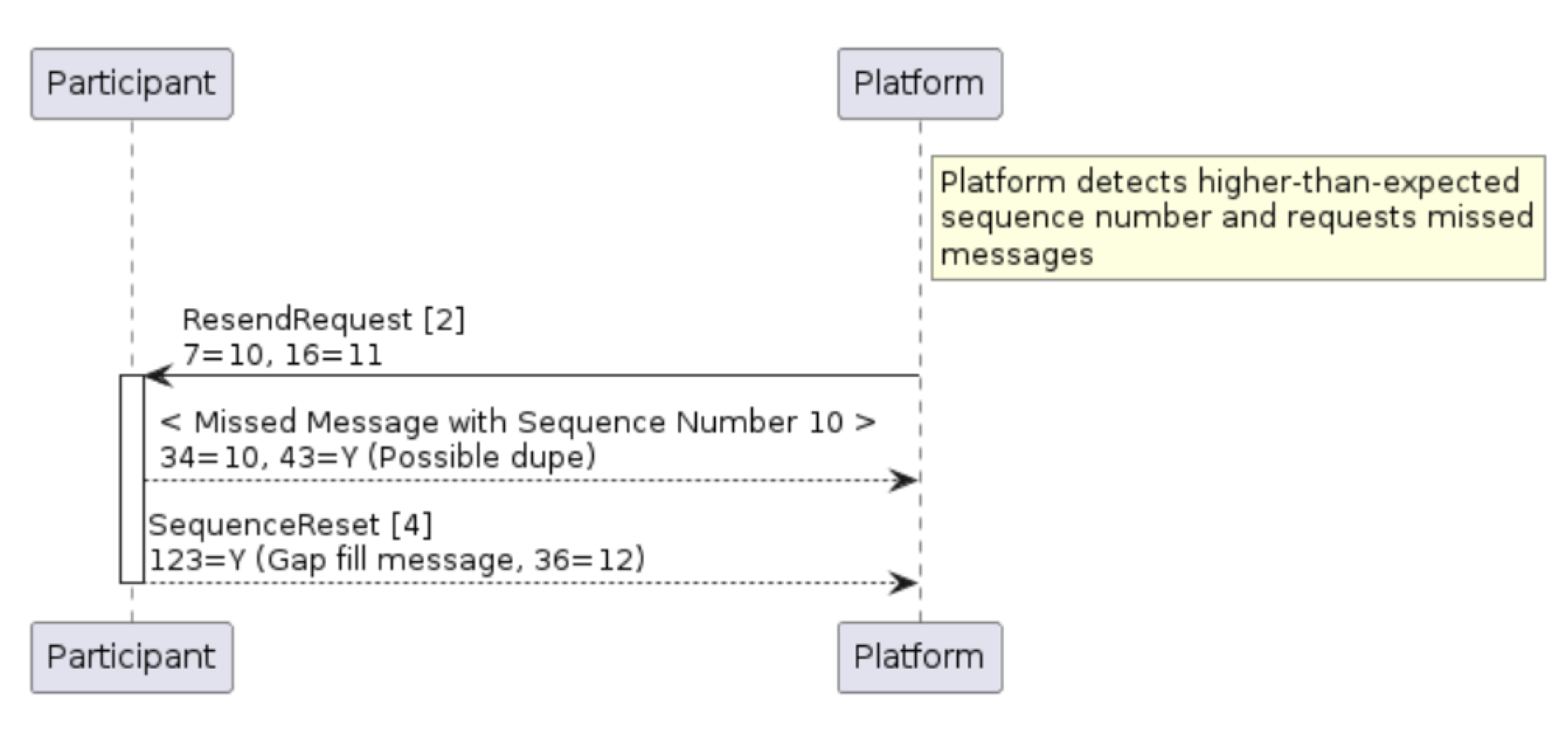
The FIX protocol uses simple, incrementing MsgSeqNum (34) values (carried in the StandardHeader of each message) to both detect and request retransmission of missed messages. Each FIX engine will maintain a simple message count of outbound and inbound messages, values which should increment by one for each message sent or received per FIX session. Should a message be received that does not match the expected sequence number given, then it is possible that one or more messages were lost. In that situation, a ResendRequest [2] message may be sent to request retransmission of a specified range of messages identified by their MsgSeqNum (34) value.Table 7: ResendRequest (2) message
| Tag | Field Name | Req’d | Data Type | Comments |
|---|---|---|---|---|
| Standard Header | Y | 35 = 2 | ||
| 7 | BeginSeqNo | Y | SeqNum | MsgSeqNum (34) of first message in the range to be resent (inclusive) |
| 16 | EndSeqNo | Y | SeqNum | MsgSeqNum (34) of the last message in the range to be resent (inclusive), or “0” to request resend all messages after the indicated BeginSeqNo (7) |
| Standard Trailer | Y |
To request that the counterparty adjusts their internal sequence number to the indicated NewSeqNo (36) value. In this case, GapFillFlag (123) is either not present or set to “N” (no). In the message replay situation described above, to replace a FIX message which will not be re-sent. In this case, GapFillFlag (123) should be set to “Y” and the NewSeqNo (36) field will contain the next sequence number to be sent.
Table 8: SequenceReset (4) message
| Tag | Field Name | Req’d | Data Type | Comments |
|---|---|---|---|---|
| Standard Header | Y | 35 = 4 | ||
| 123 | GapFillFlag | N | Boolean | Indicates that the Sequence Reset message is replacing administrative or application messages which will not be resent. |
| 36 | NewSeqNo | Y | SeqNum | New sequence number |
| Standard Trailer | Y |
Figure 3: ResendRequest [2] message triggers re-transmission of missed messages
Terminating a FIX Session
The Logout [5] message initiates or confirms the termination of a FIX session. Customers may log out of their FIX sessions at any time.Table 9: Logout (5) message
| Tag | Field Name | Req’d | Data Type | Comments |
|---|---|---|---|---|
| Standard Header | Y | 35 = 5 | ||
| 58 | Text | N | String | Free format text string |
| Standard Trailer | Y |
Figure 4: Graceful Logout sequence
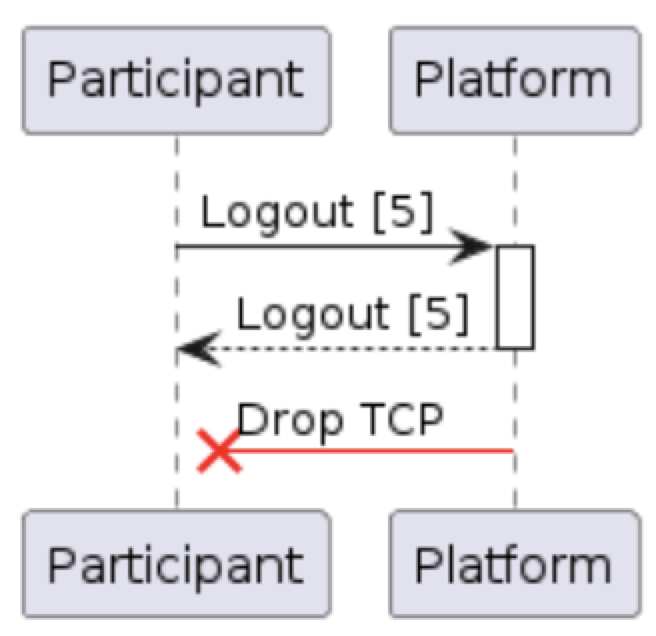 Participants are recommended to schedule a graceful logout before the start of a scheduled maintenance window. If this is not received, then the PMX Platform will initiate the logout process.
IMPORTANT: If Cancel on Disconnect is enabled, any open (unexecuted) DAY orders in the PMX platform are automatically canceled when a FIX session terminates for any reason, including a graceful logout. GTC and GTD orders will continue to rest.
Participants are recommended to schedule a graceful logout before the start of a scheduled maintenance window. If this is not received, then the PMX Platform will initiate the logout process.
IMPORTANT: If Cancel on Disconnect is enabled, any open (unexecuted) DAY orders in the PMX platform are automatically canceled when a FIX session terminates for any reason, including a graceful logout. GTC and GTD orders will continue to rest.
General Error Handling
Most transactional messages in FIX are rejected using an application-level message (as described in various sections which follow). In the event that one of these messages can not be used to reject a message, however, then the PMX Platform may return either a Reject [3] message, or a BusinessMessageReject [j] message as described below.Reject [3] messages are commonly used to reject messages where the message type is known, but there is something syntactically wrong with its content (e.g. incorrect repeating group). BusinessMessageReject [j] is a more generic message used to reject errors such as unsupported message type or malformed messages.
Table 10: Reject (3) message
| Tag | Field Name | Req’d | Data Type | Comments |
|---|---|---|---|---|
| Standard Header | Y | 35 = 3 | ||
| 45 | RefSeqNum | Y | SeqNum | The message sequence number being rejected |
| 371 | RefTagID | N | int | The tag (field) number being rejected |
| 373 | SessionRejectReason | N | int | Reason for the rejection. 0 = Invalid tag number 1 = Required tag missing 2 = Tag not defined for this message type 3 = Undefined tag 4 = Tag specified without value 5 = Value is incorrect 6 = Incorrect data format for value 9 = CompID problem 10 = SendingTime accuracy problem 11 = Invalid MsgType 13 = Tag appears more than once 14 = Tag specified out of required order 15 = Repeating group fields out of order 16 = Incorrect NumInGroup count 99 = Other |
| 58 | Text | N | String | Optional string to further describe the error |
| Standard Trailer | Y |
Example 3: Reject [3] example due to bad limit price
Table 11: BusinessMessageReject (j) message
| Tag | Field Name | Req’d | Data Type | Comments |
|---|---|---|---|---|
| Standard Header | Y | 35 = j | ||
| 45 | RefSeqNum | N | SeqNum | The message sequence number being rejected |
| 58 | Text | N | String | String to further describe the error |
| 372 | RefMsgType | Y | String | The MsgType being rejected |
| 379 | BusinessRejectRefID | N | String | When a FIX gateway rejects a message with a BusinessMessageReject, it provides tag 379 (BusinessRejectRefID) on the BusinessMessageReject and populates it with the ClOrdId or MDReqID to allow FIX clients to quickly determine which message was rejected. |
| 380 | BusinessRejectReason | Y | int | The reason for the rejection. 0 = Other 1 = Unknown ID 2 = Unknown Security 3 = Unsupported Message Type 4 = Application Not Available (downtime) 5 = Conditionally required field missing 6 = Not authorized 18 = Invalid price increment (tick size) |
| Standard Trailer | Y |
Example 4: BusinessMessageReject [j] example due to bad role permissions